Issue hierarchy and bulk child creation
Parent-child relationships are the Redmine issue hierarchy. You can move rows in the sidebar or create multiple child issues from Redmine's child issue form.
Parent dates derived from children cannot be edited directly. Redmine recalculates them when child dates are saved. Other fields remain editable according to permissions.
Previews use loaded children, so filters that hide some children can cause saved dates to differ. Schedules involving dependencies on these parents are also recalculated when saved.
Change a parent-child relationship
- Drag the issue row that should become a child.
- Drop it on the issue that should become its parent.
- Confirm the row now appears under that parent.
To detach an issue, right-click its row in the sidebar and choose Remove Parent. Invalid moves, such as making an issue its own descendant, are rejected. Redmine's standard permissions for the issues apply.
Create multiple child issues
- Right-click the parent issue in the sidebar or on its task bar.
- Choose Add Child Task to open Redmine's new child issue form.
- Expand Bulk Ticket Creation below the form. Text input is selected by default; enter one subject per line.
- To use one tracker for all entries, choose it from the tracker menu above the text box. Switch to Table input to choose a subject and tracker per row. You can add or remove rows.
- Select Create. Blank rows are skipped.
Created issues inherit the parent project's project, tracker, status, priority, and assignee. A tracker selected in the table must be enabled in the parent project's tracker list. The UI has no configured maximum row count. If creation permission or Redmine validation causes any row to fail, the server rolls back the whole batch. Correct the error and submit again.
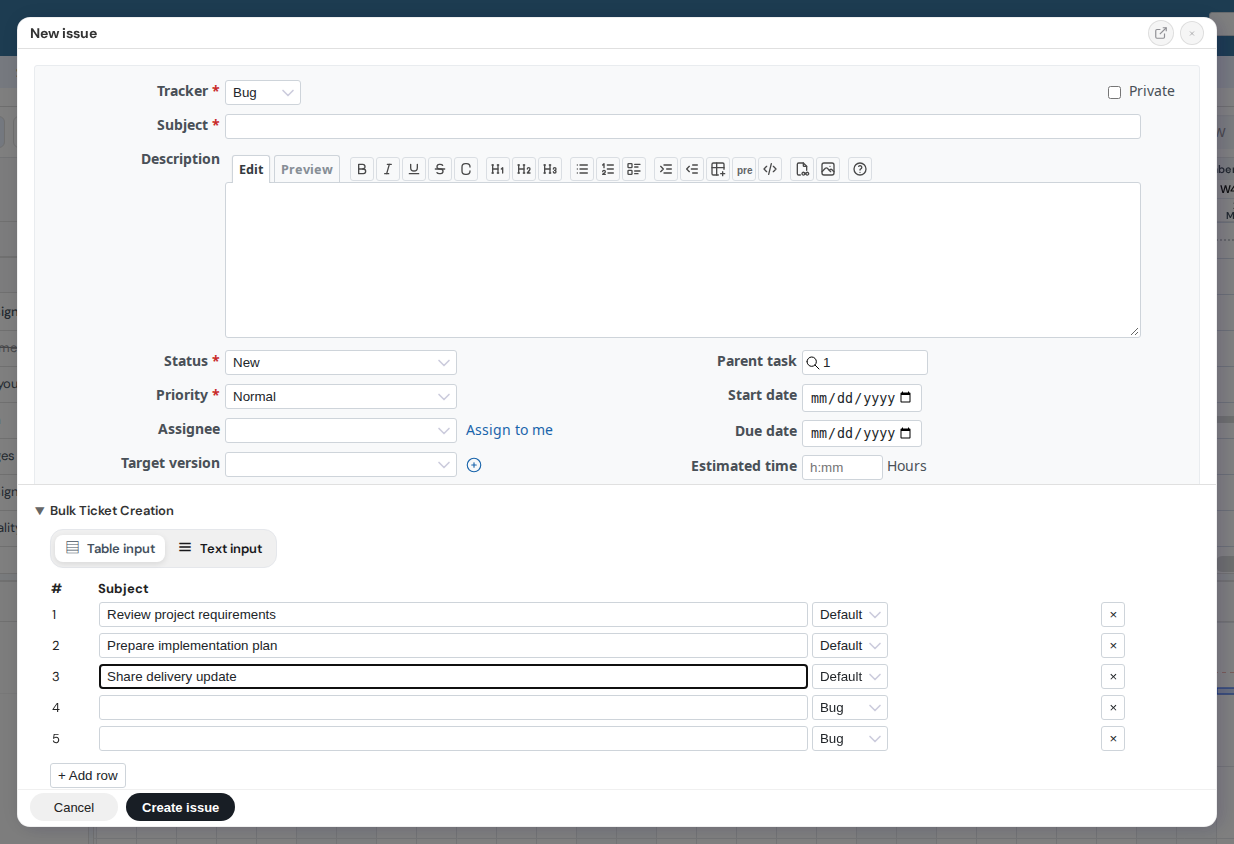
Bulk child issue form. View full-size image
Notes
Bulk creation accepts subjects and optional tracker choices; it does not let you set dates or other fields per row. Edit those fields from Redmine after creation. Parent visibility and add_issues / manage_subtasks permissions also apply.