Filters and saved queries
Filters narrow the chart to the issues you need. Shareable conditions can be saved in a Redmine query or URL. Some conditions exist only in browser state, so check what will travel with a shared link.
Canvas Gantt filters
Filter by subject text, project, tracker, target version, assignee, and status. Assignee filtering includes unassigned issues; target-version filtering includes issues with no version. Use the toolbar search field or the relevant filter menu.
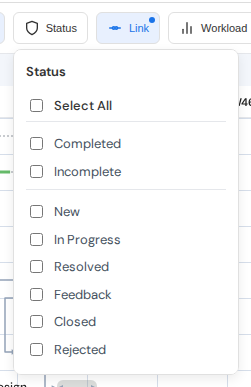
Status filter. View full-size image
Parent issues shown only to preserve the hierarchy of matching children keep their context-only status after progress, status, or date edits. That distinction and the hierarchy remain intact when an edit does not require rebuilding the display order.
Redmine saved queries
Canvas Gantt uses Redmine's issue list to create and edit saved queries. The toolbar can open a query in an iframe or a new tab, then return to Canvas Gantt with supported conditions.
The query_id URL parameter loads a visible saved query as the base condition. Explicit Canvas or Redmine URL filters override the matching fields from that query.
Grouping
Canvas Gantt groups by project or assignee. Target-version headers are a display toggle, not a third grouping mode. Expand or collapse a group from its header.
Changing a task's project or assignee name while grouped rebuilds the active group headings. Heading names follow the existing display rules; when a name is available in the project options, it takes precedence.
Shared and personal state
| State | How it is shared |
|---|---|
| Status, assignee, project, tracker, target version, subproject visibility | Saved query or URL |
query_id, grouping, sorting, visible columns | Saved query or URL |
| Subject text and workload focus | Personal browser state |
| Zoom, viewport, row height, sidebar width, and similar preferences | Browser display settings |
Subject text and workload focus filters are not included in a shared URL or saved query. See Display settings and export for the scope of browser preferences and URL and query parameters for the URL reference.