Workload
The workload pane compares estimated effort with recorded work over the visible histogram period. Planned and Actual are shown separately; daily bars are not stacked.
Open the pane
- Select Workload in the toolbar.
- Check Show Workload Pane in its menu.
- If needed, adjust Capacity Threshold and toggle Leaf Issues Only, Include Closed Issues, or Today Onward Only. These focus filters apply to both Planned and Actual.
Read the chart
- Planned is the estimate for issues assigned to a person, divided across each issue's working days.
- Actual is recorded Redmine time attributed to the person who logged the work. It can appear in a person's row even when they have no planned hours.
- Peak and total cells show Planned and Actual separately. Outlined and filled daily bars use the same capacity threshold.
- Click a series to cycle through its contributing issues. The legend, tooltips, and accessible text distinguish both series.
Focus filters are personal browser state and are not included in shared URLs.
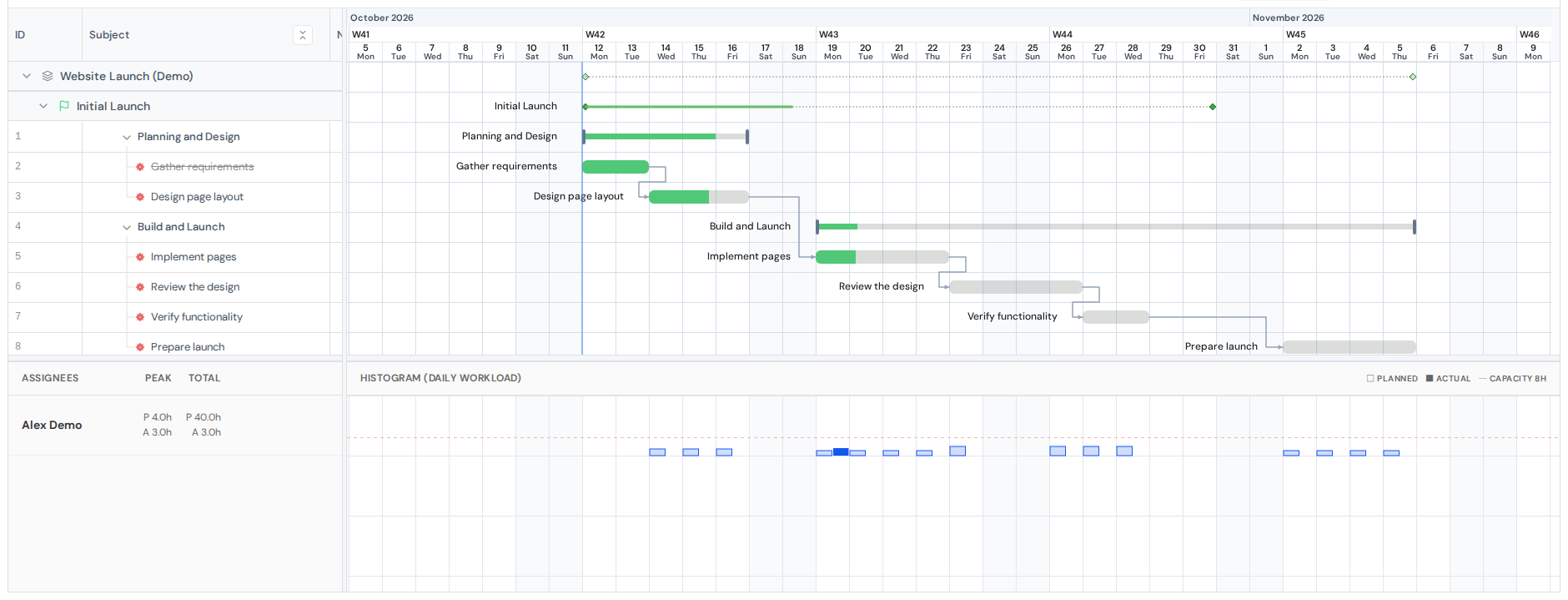
Workload pane. View full-size image
Data access and limits
Actuals include only issues and time entries visible to the current Redmine user. Totals may differ from Redmine's Issue#spent_hours. Requests cover at most 730 calendar dates, including both endpoints, and obey a configured collection budget. If the request exceeds that budget, the pane reports an error instead of partial totals.
Actuals refresh after a time entry is saved. While actual data loads or if retrieval fails, it is shown as —; planned data remains available.
Ask an administrator about visibility and aggregation limits.